fotogranina
BETA » | HOME | about | Tag Cloud | RSS feed RSS | flickr |
Showing posts with label ubuntu. Show all posts

Unix and Linux commands are very peculiar and at times cryptic. It matches the idiosyncratic humor of the geeks who designed it.
Here are some commands and utilities rendered literally in pictures:
1. time
13 watches-1

A watch repairman's booth in Baguio. Taken in 2000. Time does move very fast.


2. groups [username...]
or you can use id -Gn (prints out groups for given username).
Panagbenga crowd

a group of spectators during the panagbenga annual parade in Baguio. Taken in 2003


3. cat - use to create, view and concatenate files
cat

Found this cat while shooting in the cancer patients ward in the Philippine general hospital. You don't want to mess with this one.


4. tail - look at the end of a file.
(To follow the dog: tail -f my.dog)

tail -f my.dog

Taken recently while walking near Broadway in Sydney


5. head - opposite of tail
Nina my daughter

My daughter when she was 3 months old


6. join
Kiss

Shot with regular film in Rome in 2001. I once could relate to the man with the guitar case.


7. who - list information about accessible users
non optional

grave of an unknown soldier in Camp John Hay Baguio. Taken in 2003. Last time I passed by that place the metal crosses were gone! Or is it just my imagination?


8. mount - associate a filesystem to a mount point
rural painting

Found this view during a trip to Isabela while constantly stopping to take photos


9. man - open a manual page for a command
babysitter

As I was walking along Session Road in Baguio, this peculiar looking man quickly appears. I just had to take the photo. No time even to think. Taken on film, sometime in 2000.


10. nice
play ball

my brothers, those in normal clothes, were engaged by few players for a friendly game of ball. Nice block.


11. wc - tells how many lines, words, and characters there are in a file
please enter and enjoy

The man bids me to enter the toilet. Wait... I take a picture. You can't even imagine the what waits in the water closet: Is that what I think it is...? Doesn't matter, as long as there is relief. I close the door and hope for the best.


and finally...
12. grub

termite invasion

A termite colony has just invaded our bookshelf! It only took them a short time of three months to gut most of our books. you don't even know they're there. Lesson here: read more books!

Sunday, January 24, 2010

Youtube-dl
Somebody asked me how to download youtube videos using the command line. This post is her answer or to anyone who doesn't want to use the proprietary Flash plugin (A replacement for flash is Gnash,a free and opensource flash player, which is, I think, better the Flash), for security or ideological reasons.  Another reason may be you are bandwidth impaired like me or just want to watch youtube videos at your own leisure. Youtube-dl also works in Windows: follow this link for further information, The following instructions has been tested in Linux but could easily be applied to the MacOS or any Unix-like operating system.
You will only need Python 2.4 or greater installed to run the script, which is included by default in most Linux distributions.

First you need to install the script. Download the latest tarball from
http://bitbucket.org/rg3/youtube-dl/get/tip.tar.gz. 
you could use wget by typing in a terminal:

wget http://bitbucket.org/rg3/youtube-dl/get/tip.tar.gz
then extract the file by typing
tar xvf tip.tar.gz
then change directory
cd youtube-dl
And to download a video:
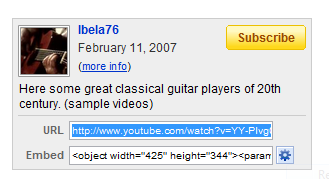
copy the youtube URL, in this example Great Guitarists of the World

then paste the URL to your terminal with the command:
./youtube-dl -t http://www.youtube.com/watch?v=YY-Plvg0PQA 
or you could use the -o switch for your own custom title so that you wont end up with meaningless strings
./youtube-dl -o Turkey.flv http://www.youtube.com/watch?v=qm5XPAOvzwg
Then simply use an appropriate media player that handles .FLV files like vlc or mplayer
Go to the this site for more information and tips.

Enjoy!

Tuesday, December 1, 2009

It's fascinating to see how far we've gone with web design and technology during the past decade. The following are screenshots I've taken 10 years back coupled with the their present iterations. This is just part 1, so come back for more.


dell.com


apple.com


nokia.com


publish.com


Thursday, November 26, 2009


Thursday, November 19, 2009